👥 Guests & Connected Sessions #
📋 Guests #
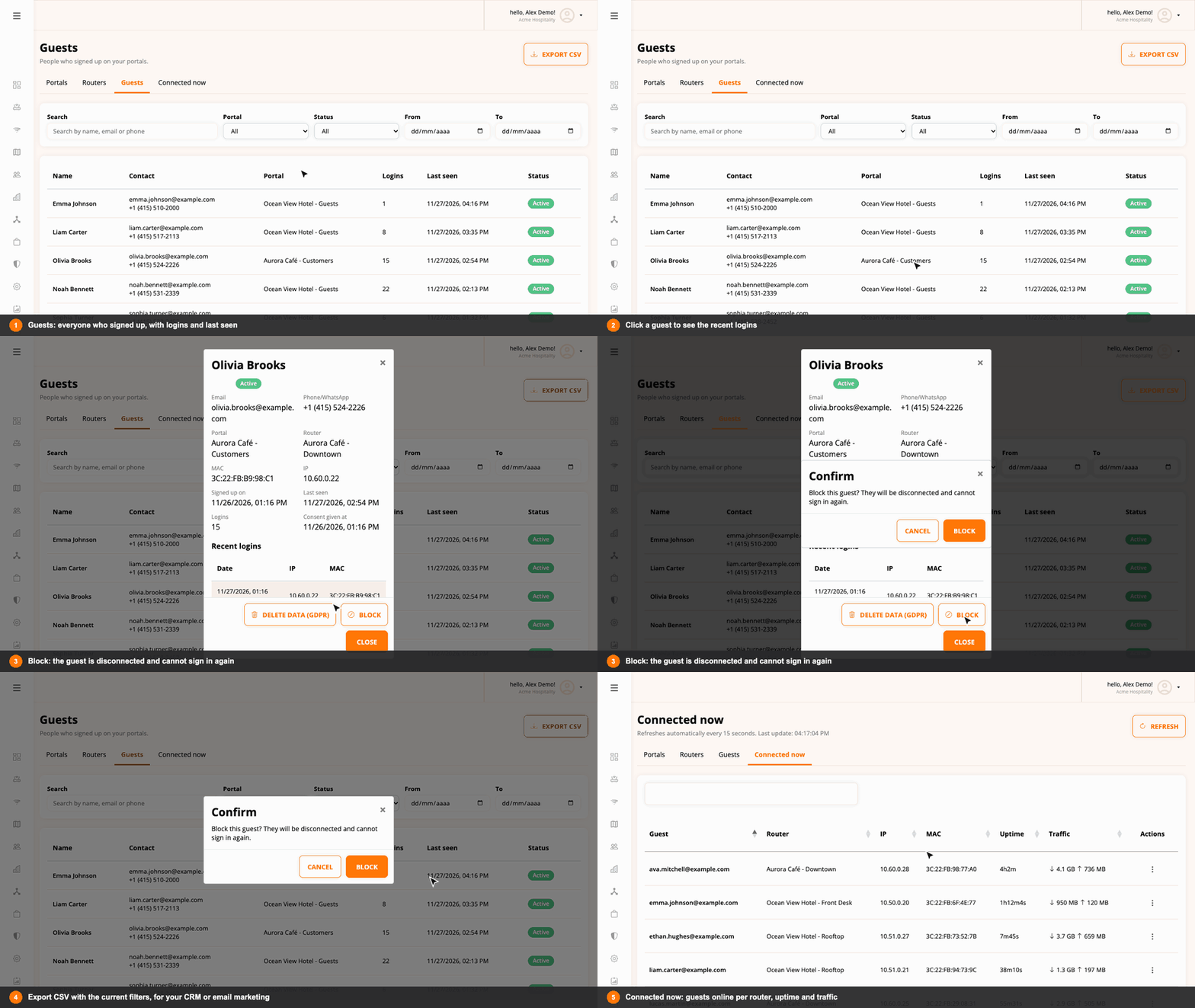
Guest Wi-Fi Portal → Guests lists everyone who signed up: name, contact, portal, number of logins, last seen and status. Filter by name, email or phone, portal, status (Active / Blocked) and period.
- Click a guest to see the Recent logins.
- Block: the guest is disconnected and cannot sign in again on any of your portals. Unblock lets them sign in again.
- Export CSV: downloads the list with the current filters (name, phone, email, MAC, IP, portal, blocked, terms acceptance, logins, last access and sign-up date) – ready for your CRM or email marketing.
🔒 Delete data (LGPD / GDPR) #
When a guest asks for their data to be removed, open the guest and click Delete data (GDPR). Name, email, phone, MAC, IP and consent details are anonymized permanently and the guest is removed from the routers. The anonymous record stays only to keep your login statistics. This cannot be undone.
🟢 Connected now #
Guest Wi-Fi Portal → Connected now shows the guests online, per router, with uptime and download/upload traffic. The list refreshes every 15 seconds.
Disconnect ends the session; the guest can sign in again through the portal. To keep someone out, use Block in the Guests tab.


