
Tabela de conteúdos (Índice)
📱 Wi-Fi Clients #
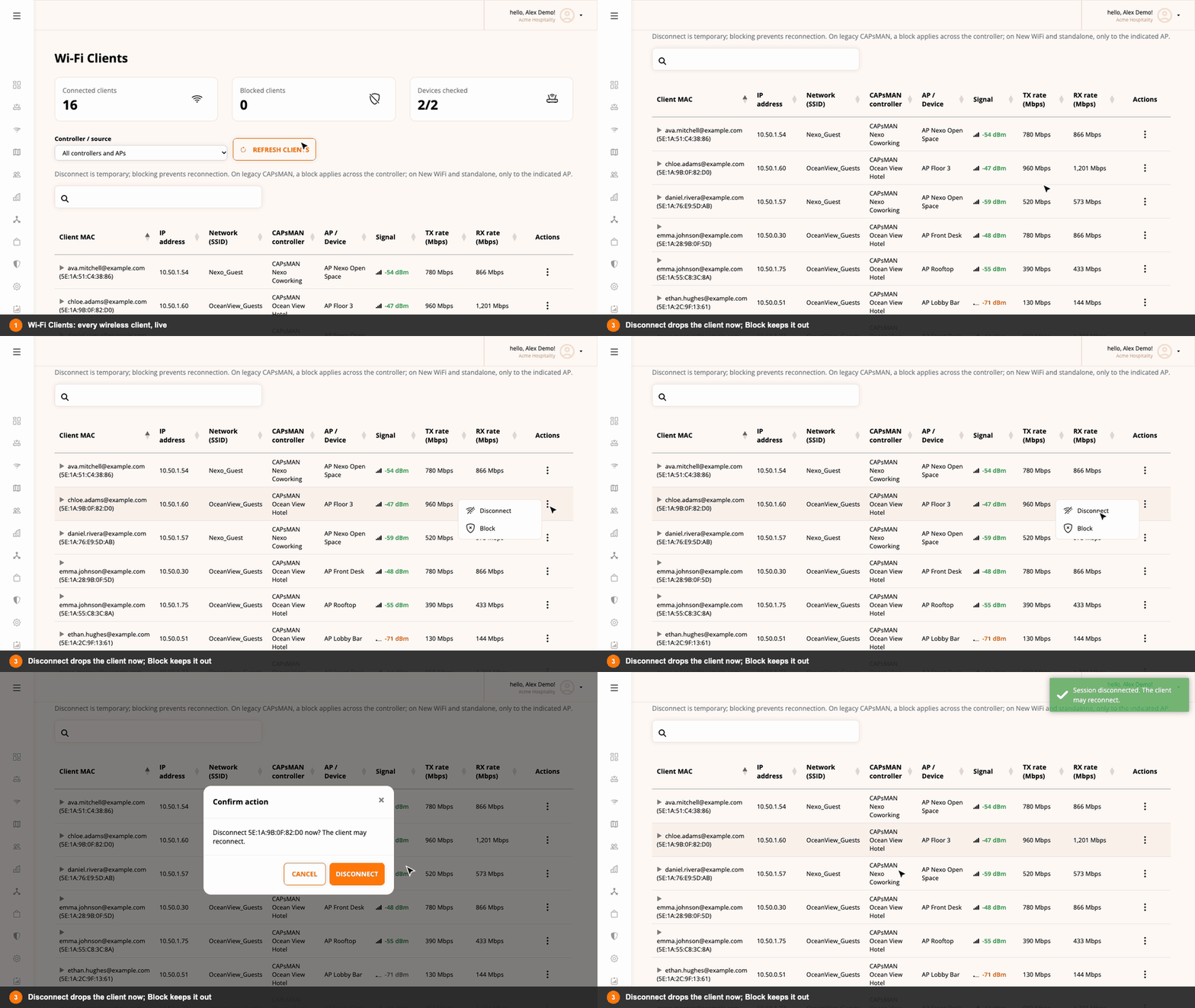
The Wi-Fi Clients tab of WiFi → Wi-Fi and CAPsMAN (also in the Dashboard menu) shows every wireless client of the company, live, read from the controllers and standalone APs.
- Cards: Connected clients, Blocked clients and Devices checked.
- Columns: client MAC, AP / device, signal (dBm), IP, network (SSID), TX/RX (Mbps), connection time and status.
- Filter by Controller / source (all controllers and APs, or only standalone APs). With many devices, filter by controller.
🎛️ Actions #
| Action | What it does |
|---|---|
| Disconnect | Drops the client now. It can connect again right away. |
| Block | Blocks the client’s MAC. On Legacy CAPsMAN the block applies to the whole controller; on New WiFi and standalone, to the AP shown. |
| Unblock | Removes a block created by the platform. Blocks created directly on the MikroTik show as External rule and must be removed there. |
📶 Signal guide: better than -65 dBm is good; worse than -75 dBm usually means the client is too far from the AP or needs another AP nearby.
🧩 If you encounter any issues, please contact support and include relevant screenshots to help troubleshoot the problem effectively.


